When you're designing systems at the architectural level, the way you represent data structures isn't just a technical detail it shapes how teams understand, build, and maintain software over time. Data model notation for architects determines whether stakeholders get the right level of abstraction, whether developers can translate your designs into working code, and whether your models hold up as systems grow in complexity. Choosing the wrong notation can lead to confusion, misalignment between teams, and costly rework down the road.
What Is Data Model Notation, and Why Does It Matter for Architects?
Data model notation is the visual language used to represent entities, relationships, attributes, and constraints in a system. For architects, it serves a different purpose than it does for developers. While a developer might need granular detail about table columns and foreign keys, an architect needs to communicate structural decisions how domains relate, where boundaries exist, and how data flows between systems.
The notation you choose signals the level of abstraction you're working at. A high-level conceptual model using simple boxes and lines tells a different story than a fully attributed logical model. Both are valid, but mixing them up creates confusion in reviews and handoff meetings.
How Is Architectural Data Model Notation Different from Developer-Level Notation?
Developers often work with detailed ER diagram notation that captures cardinality, primary keys, and data types. This level of detail is useful for implementation but can overwhelm non-technical stakeholders or clutter an architecture diagram with unnecessary specifics.
Architects typically work at two levels:
- Conceptual models Focus on business entities and their relationships. No attributes, no data types. These are useful for aligning with business stakeholders early in a project.
- Logical models Add attributes and define relationships more precisely, but still avoid implementation-specific details like indexing or storage engines.
The key difference is intent. A developer's notation answers "how do I build this?" An architect's notation answers "what does this look like, and why did we structure it this way?" If you're using UML class diagram syntax, for example, you might show associations and multiplicity without listing every method signature.
Which Notations Should Architects Know?
There's no single right answer, but a few notations come up repeatedly in architectural work:
- Chen notation Uses diamonds for relationships and ovals for attributes. Good for early-stage conceptual modeling, though it gets cluttered at scale.
- Crow's foot notation Compact and widely recognized. Shows cardinality clearly with minimal visual noise. A solid default for most logical models.
- UML class diagrams Flexible and well-supported by tools. Works well when you need to show inheritance, composition, or interface boundaries alongside data structure.
- Object-role modeling (ORM) Focuses on natural language expressions of facts. Less common in practice, but useful for domain-heavy systems where precision around business rules matters.
Most architects end up using crow's foot or UML depending on the audience. If your team is more database-oriented, crow's foot tends to land better. If your team thinks in objects and services, UML often feels more natural.
When Should You Pick One Notation Over Another?
Context drives the choice. Here are a few real scenarios:
- Pitching a system design to leadership Use a simplified conceptual model with Chen or even informal boxes-and-lines. Avoid notation that requires prior knowledge to read.
- Reviewing a database schema with the engineering team Crow's foot notation gives enough detail without being overwhelming. It maps directly to relational structures most teams already understand.
- Documenting a microservices architecture UML class diagrams work well here, especially when you need to show how data models differ between bounded contexts.
- Aligning on domain terminology with product managers A conceptual ER model or even a simple entity list can work. The goal is shared understanding, not technical completeness.
If you're working across teams with different backgrounds, consider maintaining two versions of the same model a conceptual version for discussion and a logical version for implementation planning. More on this in our full reference on data model notation approaches.
What Are the Most Common Mistakes Architects Make with Data Model Notation?
Several patterns show up repeatedly in architectural work:
- Over-detailing too early Adding every attribute and constraint in a conceptual model makes it hard to read and hard to change. Start loose, tighten later.
- Using inconsistent notation across diagrams If one diagram uses crow's foot and another uses UML in the same document, readers waste mental energy translating between styles.
- Skipping the legend Even common notations have variations. Always include a legend or link to a notation reference, especially when sharing with mixed audiences.
- Modeling implementation instead of design Showing database-specific details like triggers, stored procedures, or column-level defaults in an architecture diagram muddies the abstraction.
- Ignoring relationship semantics Drawing a line between two entities without labeling what the relationship means forces readers to guess. A simple verb phrase on a relationship line (e.g., "places," "contains," "assigned to") removes ambiguity.
How Do You Actually Use Data Model Notation in Practice?
Here's a practical example. Say you're designing an order management system. At the conceptual level, you might show:
- Customer places → Order
- Order contains → OrderItem
- OrderItem references → Product
No attributes, no cardinality numbers just entities and named relationships. This is enough for a whiteboard session or an architecture review with product and engineering leads.
At the logical level, you'd add cardinality (a customer places one or many orders), key attributes (OrderId, CustomerId, SKU), and constraints (an order must have at least one item). This version feeds into database design and API contract discussions.
The trick is knowing which version to present when. Conceptual models invite discussion. Logical models drive decisions.
What Tools Work Well for Architectural Data Modeling?
A few tools are worth calling out:
- draw.io / diagrams.net Free, browser-based, supports multiple notation styles. Good for quick models and team collaboration.
- Lucidchart Polished presentation quality, good for sharing with stakeholders outside engineering.
- ER/Studio or Erwin Enterprise-grade tools with reverse engineering and forward engineering capabilities. Overkill for small projects but valuable for large-scale data architecture.
- PlantUML or Mermaid Text-based diagramming. Good for version-controlled documentation where diagrams live alongside code.
Pick based on your workflow. If your models live in Confluence, use a tool with easy export. If they live in a Git repo, text-based options reduce merge conflicts.
Quick Checklist: Choosing the Right Data Model Notation
- ✅ Identify your audience first business stakeholders, developers, or mixed?
- ✅ Match notation complexity to the stage conceptual for early design, logical for planning, physical for implementation
- ✅ Stay consistent across all diagrams in a single project or document
- ✅ Always include a legend or notation reference
- ✅ Label relationships with verb phrases, not just lines
- ✅ Avoid implementation details in architectural models
- ✅ Keep two versions if needed one for discussion, one for handoff
- ✅ Review your model with someone unfamiliar with the project if they can follow it, the notation is working
Next step: Pick one current architecture diagram you've shared recently. Check whether the notation is appropriate for the audience that reads it most often. If it isn't, rework it at the right level of abstraction and share it again. The feedback you get will tell you more about your notation choices than any guide will.
 Uml Class Diagram Syntax Explained: Complete Data Model Guide
 Er Diagram Notation Guide for Developers: Syntax and Symbols Explained
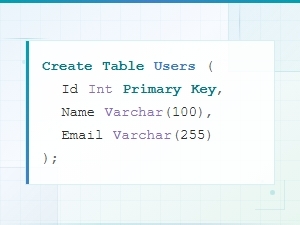 Sql Data Model Syntax Examples with Diagrams
 Logical vs Physical Data Model Diagram Syntax Explained
 Flowchart Code Syntax: a Beginner's Guide
 Mermaid Flowchart Syntax Examples and Usage