If you've ever built a database or worked on a data architecture project, you've probably seen two terms thrown around interchangeably logical data model and physical data model. The problem is, they're not the same thing, and mixing up their syntax can lead to bad designs, wasted time, and databases that don't scale. Understanding the differences in their syntax helps you communicate better with your team, write cleaner database designs, and avoid rework down the line.
This article breaks down exactly how logical and physical data model syntax differ, when to use each one, and where people commonly go wrong.
What Is the Difference Between a Logical and Physical Data Model?
A logical data model describes what data the system needs to store and how pieces of data relate to each other. It focuses on business concepts entities, attributes, and relationships without worrying about how a specific database engine will implement them.
A physical data model describes how that data gets stored in an actual database. It includes table names, column data types, indexes, constraints, and storage details tied to a specific DBMS like PostgreSQL, MySQL, or Oracle.
The syntax for each model reflects this difference. Logical syntax uses business-friendly terms and abstract structures. Physical syntax uses database-specific SQL conventions and technical details.
What Does Logical Data Model Syntax Look Like?
Logical model syntax focuses on entities, attributes, and relationships. You won't see data types like VARCHAR(255) or INT here. Instead, you'll see:
- Entity names written as business concepts (e.g., "Customer," "Order," "Product")
- Attributes listed with descriptive names (e.g., "Customer Name," "Order Date")
- Primary keys identified, but without specifying auto-increment or sequences
- Relationships expressed as one-to-many, many-to-many, or one-to-one with cardinality
- Business rules noted as annotations (e.g., "A customer may place zero or many orders")
A simple logical model might look like this conceptually:
- Entity: Customer
- Customer ID (Primary Key)
- Customer Name
- Email Address
- Entity: Order
- Order ID (Primary Key)
- Order Date
- Total Amount
- Relationship: Customer (1) → Order (Many)
Notice there's no mention of VARCHAR, DECIMAL(10,2), or foreign key constraint syntax. That's the whole point the logical model stays abstract. If you want to see how this fits into broader diagramming approaches, check out our guide on data model diagram syntax.
What Does Physical Data Model Syntax Look Like?
Physical model syntax translates the logical design into something a database engine can execute. Now you'll see SQL-compatible definitions:
- Table names (often pluralized or abbreviated: "customers," "orders")
- Column definitions with exact data types (
VARCHAR(100),INTEGER,TIMESTAMP) - Primary key and foreign key constraints with explicit syntax
- Indexes defined for performance
- Default values,
NOT NULLconstraints, andUNIQUEconstraints - Schema or tablespace specifications
Here's what the same Customer-Order model looks like in physical SQL syntax:
CREATE TABLE customers (-
customer_id SERIAL PRIMARY KEY, -
customer_name VARCHAR(100) NOT NULL, -
email VARCHAR(255) UNIQUE NOT NULL );
CREATE TABLE orders (-
order_id SERIAL PRIMARY KEY, -
customer_id INTEGER NOT NULL REFERENCES customers(customer_id), -
order_date TIMESTAMP DEFAULT CURRENT_TIMESTAMP, -
total_amount DECIMAL(10,2) NOT NULL );
This is concrete, executable, and database-specific. For more SQL-based examples of physical models, our article on SQL data model syntax examples walks through several use cases.
Why Does the Syntax Difference Matter in Practice?
The syntax gap between logical and physical models isn't just academic. It has real consequences:
- Communication: Business stakeholders can read a logical model. They can't read
VARCHAR(255) NOT NULL. - Portability: A logical model works across any database engine. A physical model written for PostgreSQL won't necessarily run on SQL Server without changes.
- Maintenance: When business requirements change, you update the logical model first, then regenerate or manually adjust the physical model. If the two are mixed together, changes become error-prone.
- Performance tuning: Indexes, partitioning, and storage parameters only exist at the physical level. Keeping them separate from business logic makes tuning easier.
When Should You Use a Logical Model vs. a Physical Model?
Use a logical data model when you're:
- Gathering requirements from business teams
- Designing the initial schema before choosing a database engine
- Documenting data architecture for cross-functional review
- Planning a system that might need to support multiple database platforms
Use a physical data model when you're:
- Ready to implement the database in a specific DBMS
- Optimizing for query performance with indexes and partitioning
- Writing migration scripts or deploying schema changes
- Generating DDL (Data Definition Language) scripts
Most teams need both the logical model first, then the physical model as an implementation step. Understanding ER diagram notation for developers can help bridge the gap between these two stages.
What Common Mistakes Do People Make With These Two Models?
Skipping the logical model entirely
Jumping straight to CREATE TABLE statements without a logical design leads to databases that reflect implementation shortcuts rather than actual business needs. You end up with tables that are hard to explain to anyone outside the engineering team.
Using database-specific syntax in a logical model
If your "logical" model includes AUTO_INCREMENT, VARCHAR, or storage engine choices, it's already a physical model. Mixing the two creates confusion about what's a business decision and what's a technical one.
Not keeping models in sync
Teams often create a logical model, build the physical model from it, then change the physical model without updating the logical version. Over time, the two diverge and neither becomes a reliable source of truth.
Over-normalizing the logical model
Normalization is a physical-level concern in many cases. Your logical model should reflect how the business thinks about data, not how you plan to store it for third normal form compliance.
How Do Notation Systems Fit Into This?
Both logical and physical models use notation systems to visualize relationships. Common notations include Chen notation, crow's foot notation, and UML class diagrams. The notation itself isn't tied to logical or physical you can use crow's foot for either. But the level of detail in the diagram changes:
- Logical diagrams show entity names, attributes with business names, and relationship cardinality
- Physical diagrams show table names, column types, primary keys, foreign keys, and indexes
The symbols look similar, but the content tells you whether you're looking at a logical or physical representation.
Can One Person Handle Both Models?
On small teams, yes one person often designs both. But the thinking required is different. The logical model requires understanding business processes and data relationships. The physical model requires understanding database internals, indexing strategies, and performance trade-offs.
Even if one person does both, treat them as separate deliverables with separate syntax rules. Don't cut corners by collapsing them into a single document.
Quick Checklist: Logical vs. Physical Data Model Syntax
- ✅ Logical models use business-friendly entity and attribute names no data types
- ✅ Physical models use DBMS-specific syntax including data types, constraints, and indexes
- ✅ Logical models describe relationships and cardinality in business terms
- ✅ Physical models use foreign keys and referential integrity constraints
- ✅ Always create the logical model before the physical model
- ✅ Keep both models updated when requirements change
- ✅ Use a consistent notation system (like crow's foot) across both levels
- ✅ Don't put
VARCHAR,INDEX, orAUTO_INCREMENTin a logical model - ✅ Don't skip the logical model just because it feels like extra work it saves time later
Next step: Take your current database schema and reverse-engineer it into a logical model. Strip out all data types, constraints, and index definitions. What's left should make sense to someone who has never seen a line of SQL. If it doesn't, that's a sign your logical and physical layers need better separation.
 Uml Class Diagram Syntax Explained: Complete Data Model Guide
 Er Diagram Notation Guide for Developers: Syntax and Symbols Explained
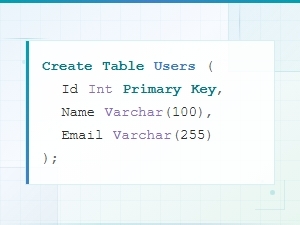 Sql Data Model Syntax Examples with Diagrams
 Data Model Notation Guide for Architects: Diagram Syntax Explained
 Flowchart Code Syntax: a Beginner's Guide
 Mermaid Flowchart Syntax Examples and Usage